Get in touch

Case study · Personal project, in beta

myMTN Reimagined

I redesigned the myMTN app in Figma and built it with AI agents. Testers use it on their own phones through TestFlight.

Role
Designer and builder
Team
Solo, with AI agents
Platforms
iPhone, Android, web
Status
In beta, 2026

Personal
project

This is my own project, not MTN's. It isn't an MTN product and it doesn't replace the myMTN app. I'm not planning to release it: it's my first app, and I built it to test with people and learn from what they find. Every balance, number and payment in it is pretend.

Live prototype

The real app, running in the page.

It's built from the same code as the TestFlight app. Pick a flow to watch it, then tap the phone to use it yourself.

Starts at the beginning. Nothing is charged.

197Phone screens in the Figma fileSource: Figma, October 2026
4Beta builds since 15 SeptemberSource: Release tags in the code
1Codebase for iPhone, Android and webSource: The app's code
In short
The idea
I redesigned the myMTN self-service app on Raanaa, MTN's design system, and built it for people to try on their phones.
How it's built
It's one Next.js codebase. Capacitor packages it for iPhone and Android, and the same build runs on the web, including this page.
How I worked
I designed every screen in Figma, then gave Claude Code, Codex and Cursor written rules to follow as they built it.
Where it is
In beta on TestFlight. The seven flows on this page work end to end. Others, like roaming, are partly built.
Chapter 01The brief

An app you judge by using it.

I started this to learn. I wanted to take a design all the way to an app on real phones, and see what I could improve along the way.

The brief I wrote for it is short: testers install it on their own iPhone or Android phone, and it has to look and behave like a real consumer app. People judge it by signing in and buying data, the way customers would.

It's built on Raanaa, the design system I work on at MTN. The agents have to use Raanaa's tokens for every colour, and they aren't allowed to hard-code one.

I scoped it in phases. The first was the way in: splash, onboarding, sign in, and a home screen with balances. The second added the journeys people open the app for: buying data and airtime, offers, sharing, roaming and FibreX. All the data is pretend, so nobody's money or account is ever involved.

  1. P1Feel nativeGestures, sheets, haptics and Face ID that behave like an iPhone app.
  2. P2On brandRaanaa tokens for every colour, type and radius. No one-off hex values.
  3. P3Easy to tryInstalled in under a minute from TestFlight or an APK, or opened from a link.
  4. P4Safe to tryNo real accounts, no real money. The code is always 123456.

The goals from the project's own brief. The install time is a target, not a measurement.

Chapter 02Web or native

I built it as a website that installs as an app.

The usual way to build one phone app for iPhone and Android is React Native, often with Expo. I looked at it next to Capacitor, which takes a website and packages it as a native app with access to the phone's features.

Decision 01P1 P3Feel native, easy to tryThe goalsIt has to feel like an iPhone app, and anyone should be able to try it.

Next.js, wrapped in Capacitor.

One web codebase becomes an iPhone app, an Android app and a website. Face ID and vibration come from Capacitor plugins.

Instead of
React Native with Expo, which builds the screens from native parts.
Why
Next.js was the stack I'd already shipped with agents on an internal tool, so I could spend my time on design instead of a new framework. And because the app is a website underneath, anyone can try it from a link, like on this page.
The cost
There's no Expo Go, so testers install a real build. And a website doesn't feel native for free: the sheet curves, haptics and crisp artwork on iPhone all had to be built on purpose.

A change starts in Figma and ends up in all three places the app runs.

The pipelineOne design, three places it runs
  1. 01 · DesignFigmaAgents read the frames through the Figma MCP.
  2. 02 · BuildNext.jsOne codebase, exported as a static site.
  3. 03 · Ship
    • iPhoneCapacitor, Xcode, TestFlight
    • AndroidCapacitor, a signed APK
    • The webVercel, and this page

What it took to feel native

Four details I built so a website would feel like an iPhone app.

Detail 01: one motion for every sheetThe same sheet, both at 500ms. Left: the browser's default ease. Right: the curve every sheet in the app uses.
Chapter 03Directing the agents

I designed every screen, then directed three agents to build them.

I work in Figma first. When a frame is ready, I hand the agent its link, and the rule is that a Figma link means a one-to-one build: the agent reads the frame through the Figma MCP and matches it. Then I review it on the phone, and we go again until it feels right.

Each agent had a job, and they all read the same rules and hand-off notes before touching anything, so any of them could pick up where another stopped.

  1. AGENTS.md

    "Always use Ranaa semantic color tokens for UI colors. Never hardcode hex/rgb in components."

  2. CODEX_WORKING_MEMORY.md

    "Figma links mean 1:1 implementation unless the user explicitly says otherwise."

  3. CONTEXT-RECENT.md

    "Every sheet opens by sliding up from under the screen and closes with the same slide back down."

  4. .cursor/rules/ios-xcode-workflow.mdc

    "After web/UI changes, sync to iOS and tell user to press Play in Xcode."

Quoted from the project's files. Raanaa is spelled "Ranaa" in the repo.

Chapter 04Start and sign in

From the logo to your balance in four screens.

The splash draws the MTN ring like a pen stroke, stamps in M, T and N with a light tap of vibration for each, then the oval opens into onboarding. It takes 1.6 seconds.

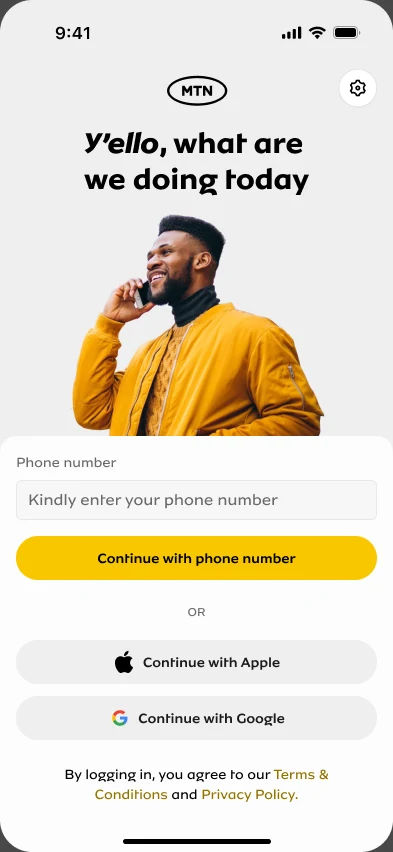
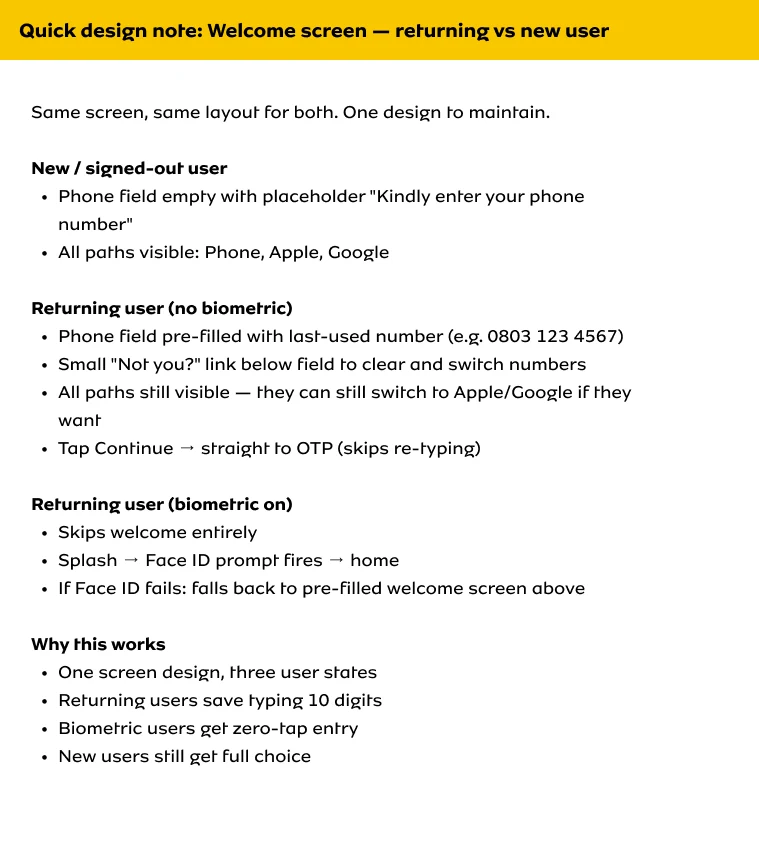
Signing in is a phone number, a six-digit code, and you're home. Apple and Google work too. I wrote a design note so one welcome screen covers three cases: new users, returning users with their number filled in, and returning users with Face ID, who skip it.

Start and sign inSigning in on the live build: a number, the code 123456, and the home screen with the first popup.
Chapter 05Light and dark

Switching to dark is a nightfall.

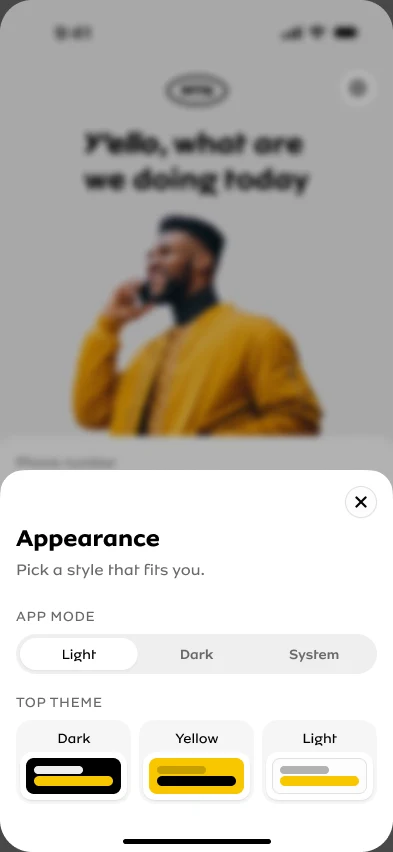
The Appearance sheet on the welcome screen has Light, Dark and System, plus a top theme. Pick dark and it spreads out of the button you tapped in a growing circle, with a moonlit edge, stars that light up as the dark reaches them and a moon rising. Pick light and you get a warm yellow edge and the sun.

The app stays light until someone chooses, because the screens aren't designed for dark yet.

Light and darkNightfall: the dark spreads from the button, stars light up, and a moon rises.
Chapter 06Face ID

Faster sign-in and payments, with one clear way to say no.

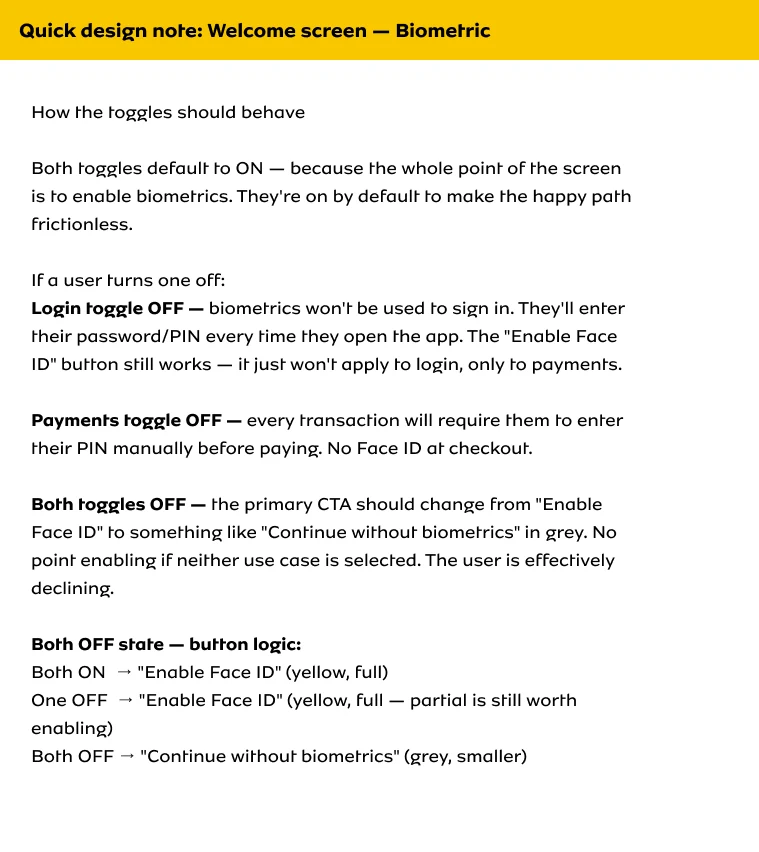
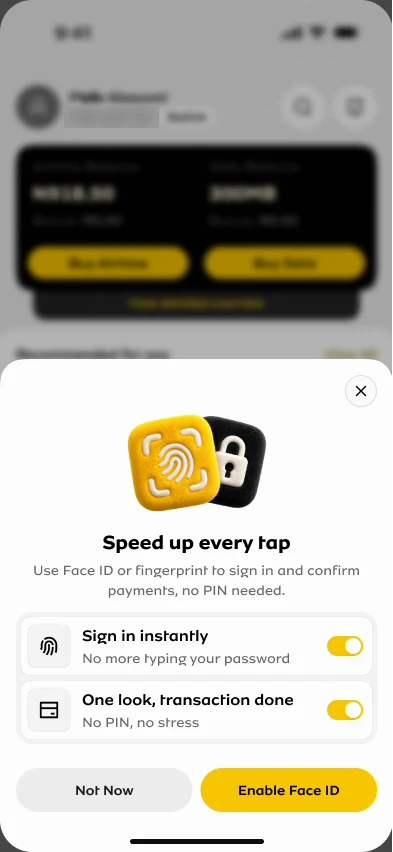
After the first sign-in, a sheet offers Face ID for two things: signing in, and confirming payments without a PIN. Both are on by default, because turning them on is the whole point of the sheet.

I wrote down what happens when people change them before any code existed. One on still enables Face ID, since half is still worth having. Both off, and the two buttons become a single grey "Continue without biometrics", because "Not Now" next to it would be a second way to do the same thing. The built sheet follows the note exactly.

Face ID needs the installed app. In a browser the app checks, finds no Face ID, and carries on without it.

Face IDBoth toggles off, the button becomes "Continue without biometrics". One back on, it's "Enable Face ID" again.
Chapter 07Home

Balances first, then what you came to do.

Every home exploration keeps the same top: who you are and which line you're on, then your airtime and data balances, each with its own Buy button. What I kept changing was everything under them.

The newest version adds Buy again, so a recent purchase is one tap away, and a menu that lets you pick which quick actions show on home, with a handwritten hint pointing at Customise.

Four of the home explorations in the Figma file. The phone number is blurred.

HomeThe menu, the handwritten hint, and choosing which quick actions show on home.
Chapter 08Popups

Popups wait their turn.

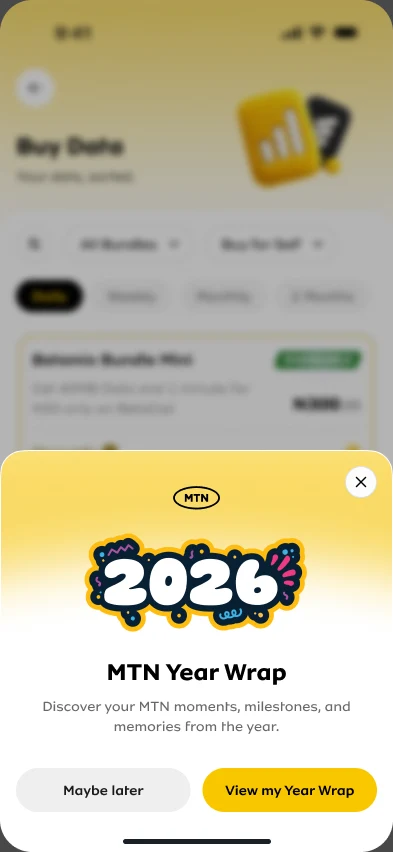
Home has more than one thing to say after you sign in: the Year Wrap and the Face ID offer. Shown together they'd stack, and you'd close sheets before you could see your balance.

So they queue. The Year Wrap comes first, and the Face ID offer only appears after it closes. Each shows once per visit.

PopupsThe Year Wrap: the entry sheet, then your year as a story.
Chapter 09Buy data

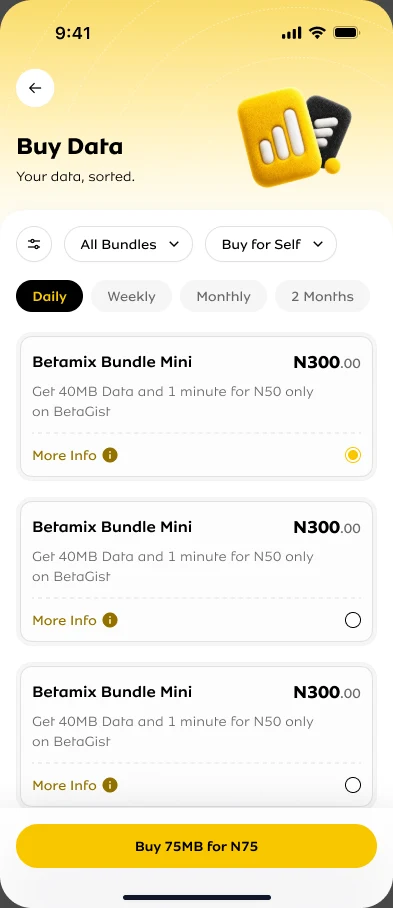
Pick a bundle, confirm once, see your new balance.

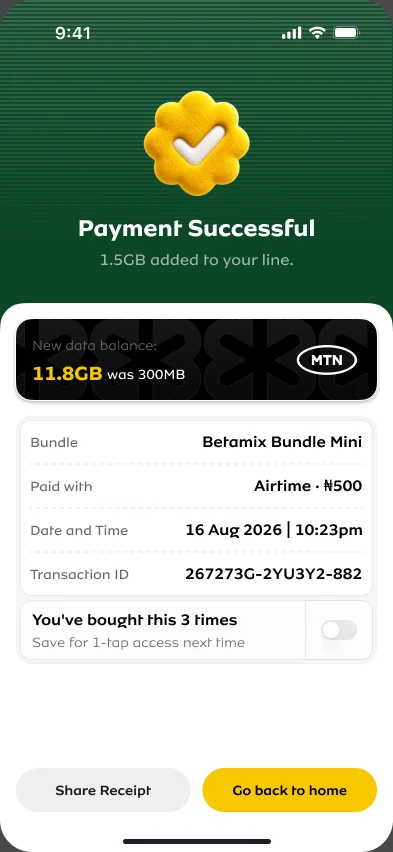
Bundles are grouped by how long they last. Choose one and a single sheet shows everything before you pay: the bundle, who it's for, how you're paying and whether it renews. Pay, and the success screen shows your new balance first, then the receipt.

If you've bought the same bundle a few times, the success screen offers to save it for one-tap buying next time.

Buy dataBuying a bundle on the live build: choose, confirm, pay, and the new balance.
Chapter 10Offers

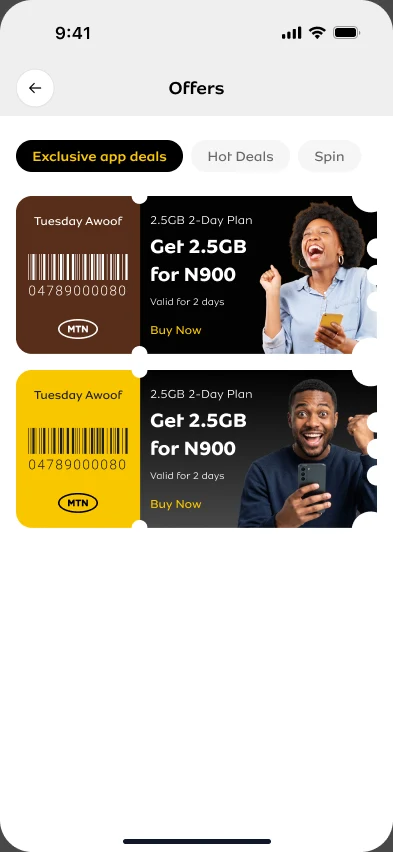
Tear a ticket to claim a deal.

Offers look like printed tickets. Tap one and it lifts to the middle of the screen. Pull the stub down and the perforation rips from the top notch, with a tap of vibration at every hole. The stub swings away, the ticket stamps CLAIMED, and checkout opens with that bundle.

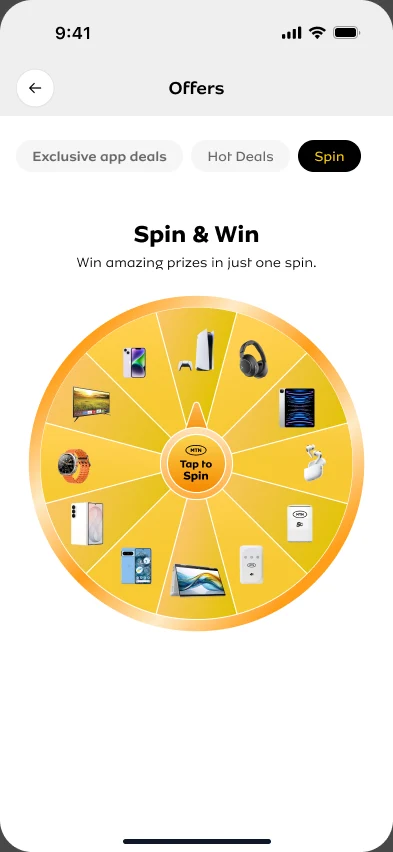
The Spin tab is a prize wheel. Flick it and the pointer clicks over every wedge, then the prize comes out of a gift box. You get one spin per visit.

OffersTear to claim: pull the stub, it rips along the perforation, and the ticket stamps CLAIMED.
Chapter 11Testing it

Testers install it on their own phones.

iPhone testers get it through TestFlight, and Android testers get a signed APK. Each beta is tagged in the code.

One problem wasn't in the code at all. A tester couldn't install a build that others already had. The build was fine: they had most likely been added with an account role that can't receive internal builds.

Nine people have it on TestFlight, me included, in one internal group. The other eight have opened it 139 times between them, on phones from an iPhone XS on iOS 18 to an iPhone 17 Pro Max.

There's no plan to put it in the App Store. The point is to find out what works before I build further, and so far the only written feedback in TestFlight is my own. The next round asks testers directly.

From App Store Connect, 24 October 2026. The row with 115 sessions, 4 crashes and the one piece of feedback is my own phone.

  1. MayFirst iPhone build, splash and onboarding
  2. MaySign in, home and themes
  3. SepPhase 2 journeys, first TestFlight build ready
  4. SepYear Wrap, Face ID, signed Android APK
  5. SepOffers, Spin and Win, sharing
  6. OctBuild 5: dark mode pass, swipe backLatest

From the app's commit history and release tags, 2026.

Chapter 12What's next

Still in progress.

  1. Dark mode. The switch works, and the screens still need designing for it.
  2. Roaming. Pay-as-you-go plans and the FAQ aren't built yet.
  3. Prizes. Spin and Win prizes can't be claimed yet, and offers don't remember being claimed after a reload.
  4. A round with testers. Collect what they found and fix it before the next build.

Credits

Design and build
Egbemode AbayomiFigma, Claude Code, Codex, Cursor
Design system
RaanaaMTN's design system
Native shell
CapacitoriPhone and Android
Testers
The colleagues on TestFlight
myMTN Reimagined

myMTN in 30 seconds

The launch film I made for the redesign: footage on Higgsfield, motion built in code with Remotion.

0:00