Get in touch

Case study · Shipped

MoMo PSB

The MoMo app people use to move money, and MoMo Corporate, the web platform businesses use to open an account. Two products for MTN's payment service bank.

Role
Lead product designer
Team
Me, with help on dark mode
Platforms
iPhone, Android, web
Years
2023 to 2025
64Features after launchSource: Release 2 Figma file
13Flows with error statesSource: Release 1 Figma file
3 → 1Form sections per personSource: Corporate form, 2025
In short
The project
MoMo Payment Service Bank is MTN's bank, licensed by the Central Bank of Nigeria. I worked on two of its products: the MoMo app, where people send money, buy airtime and data and pay bills, and MoMo Corporate, where a business applies for a corporate account and MoMo's staff review it.
The problem
Both had the same weak spot. People couldn't always tell what was happening to their money or their application. The app could say a purchase was processing after it had failed. A business that applied couldn't see where its application was, and the staff reviewing it had no view of the whole queue.
What I did
I focused on the points where people worry about their money: when a payment fails, just before it moves, at sign-in, and at each review step a business goes through. Five decisions shaped the work, three in the app and two in Corporate.
My part
I designed almost all of the app, in sprints with MoMo PSB's business analysts, product owners and engineers. Yasmeen Adebisi helped when we moved screens to dark mode. I designed MoMo Corporate on my own: the business's application and the staff side behind it.
Where it is
Shipped. I designed the app in 2023 and 2024 and MoMo Corporate in 2024 and 2025, and both are live today. After launch, MoMo PSB's figures showed onboarding drop-off down 30%, transaction success up 20%, engagement up 25% (about ₦150M more in transactions a month) and corporate account invitations up 20%. Those cover whole products, so each decision below also says what would show its own effect.
How I worked
  1. Review

    2reviews

    The app, then competitors

  2. Design

    3sprints

    The first release, flow by flow

  3. Hand over

    13flows

    Each with its error states

  4. Keep shipping

    64requests

    One Figma page each

  1. P1The app and the SMS disagreedA failed purchase could read "processing" in the app while the SMS said it had failed.Solved in Decision 01
  2. P2Transfers fail on the other sideA transfer can fail at the receiving bank, after you've already pressed send.Solved in Decision 02
  3. P3Codes that don't arrive"Why didn't I receive the SMS OTP code?" was the first question in the app's own FAQ.Solved in Decision 03
  4. P4Regulation sets the limitsThe CBN's tiers decide how much a customer can hold and send, and what a business must prove.Shown in Chapter 05
  5. P5Applications went quietOpening a corporate account was manual and hard to track, for the business and for MoMo's staff.Solved in Decisions 04 and 05
  6. P6Two teams sign offOnboarding checks the documents and compliance screens the people. Neither step can be skipped.Shown in Chapter 08

The six problems this work had to answer. Each decision below names the ones it solves, by number.

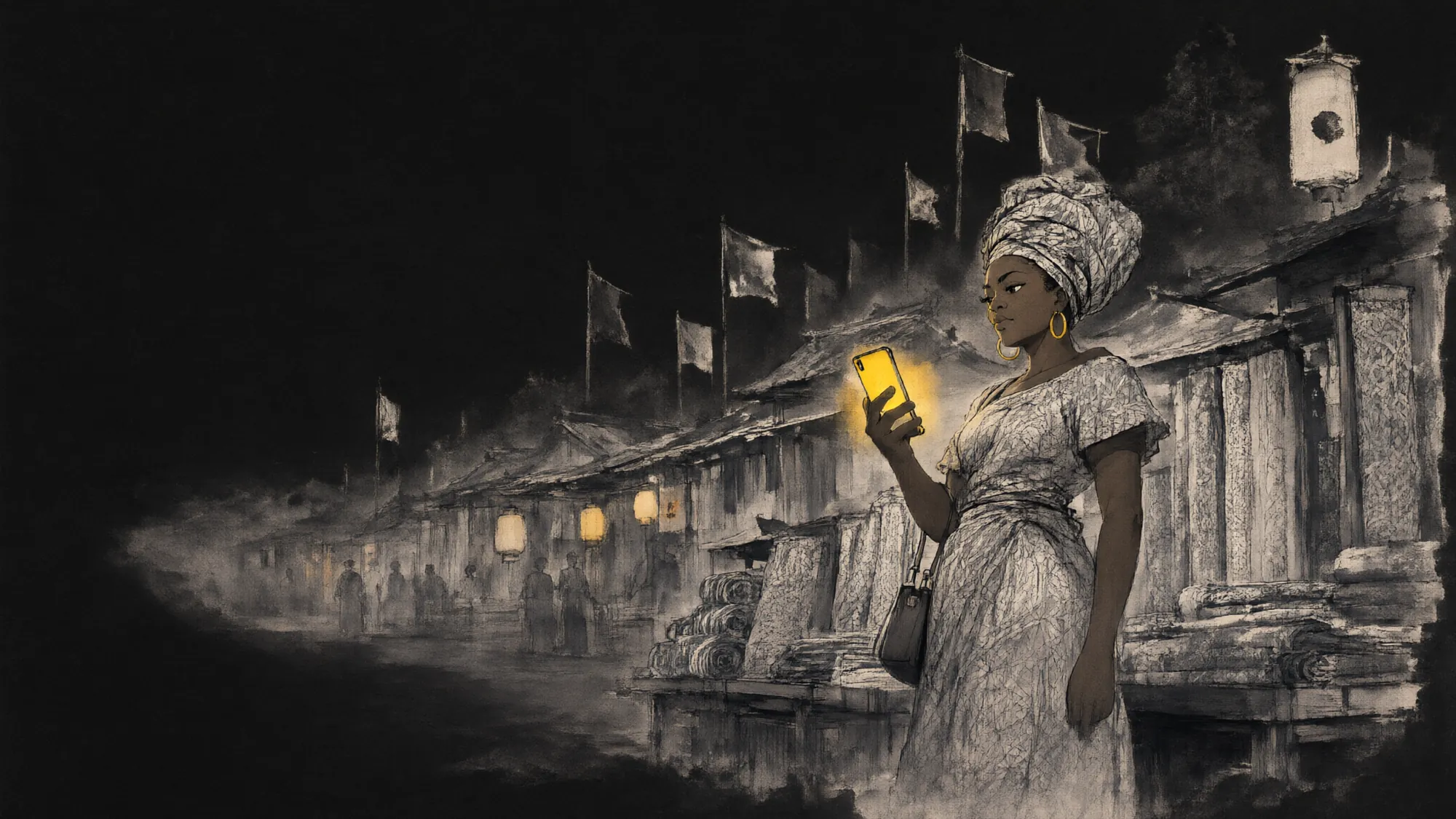
An ink painting of a Lagos fabric market at dawn, drawn like an old Japanese market street: stalls with curved roofs, lanterns and mist. A trader in a gele stands at her stall, her phone glowing yellow.An ink painting of the same Lagos fabric market at night, drawn in pale ink on black: lanterns glow amber along the stalls, and the trader in a gele stands at her stall, her phone glowing yellow.

Part one

The MoMo app

For people: send, buy, pay. iOS and Android.

Design note · the app

  1. Context

    People use the app to send money, buy airtime and data and pay bills. MTN customers and customers on other networks can open an account.

  2. Goal

    Every money moment says what will happen, what happened, and what to do next.

  3. Non-negotiables

    The CBN's account tiers and KYC rules. The four-digit transaction PIN. One way of moving money across every service.

  4. How we'd know

    Fewer complaints about failed transactions, fewer sign-ins lost to codes that never arrive, more customers upgrading their tier.

Chapter 01The brief

A bank that lives on a phone, and a door for businesses.

I redesigned the app in sprints. I started with a heuristic review of the existing app, then studied how other finance apps handle the same flows, using Mobbin, and moved flow by flow: sign-up, sign-in, home, add money, transfers, airtime, data, bills and statements in the first release. Every flow went to engineering with its error and empty states already drawn.

After the first release the requests kept coming: 64 of them, each on its own Figma page, from tap to pay to a text size setting. Alongside the app I designed MoMo Corporate, the web platform where a business opens a corporate account and MoMo's staff check it. Both had the same job: tell people what is happening to their money.

The first release, from the Release 1 Figma file. Names, numbers and balances on every screen in this case study are test data.

Chapter 02When money fails

Say it failed, the moment we know.

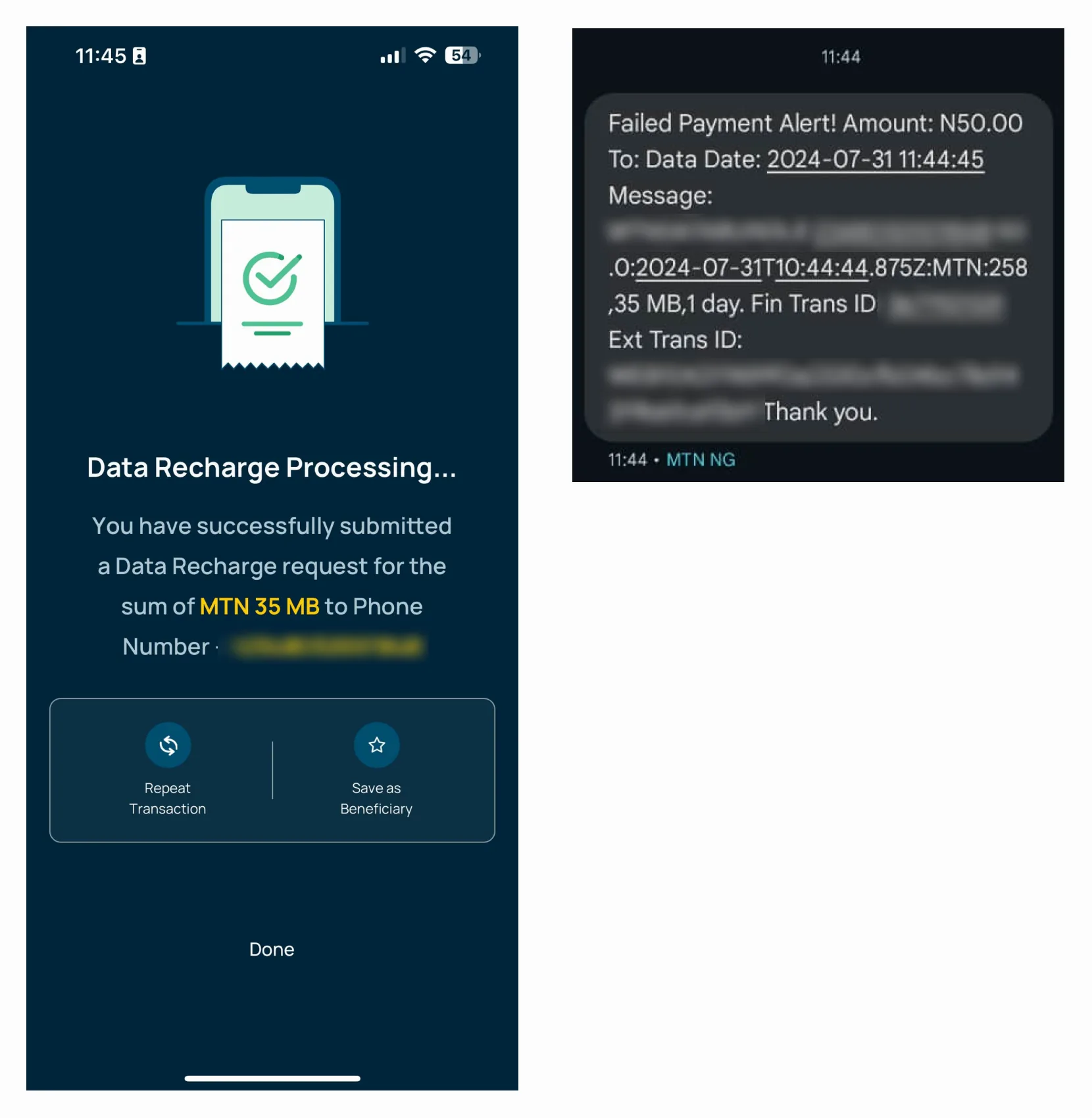
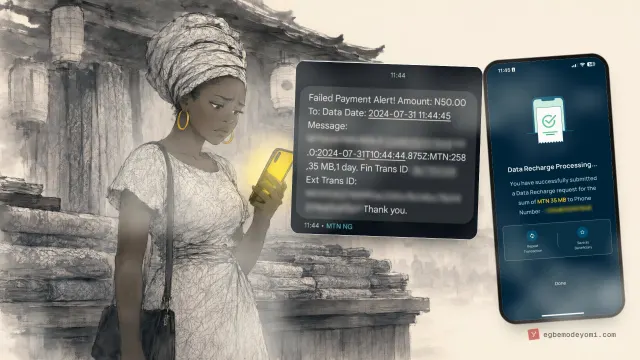
The clearest signal in the whole project was a pair of screenshots. A customer bought ₦50 of data. The app said the request had been submitted and was processing. At the same moment, an SMS from the same bank said the payment had failed.

Decision 01P1The app and the SMS disagreedThe problemA failed purchase could read "processing" in the app while the SMS said it had failed.

Name the outcome plainly, and put the next step beside it.

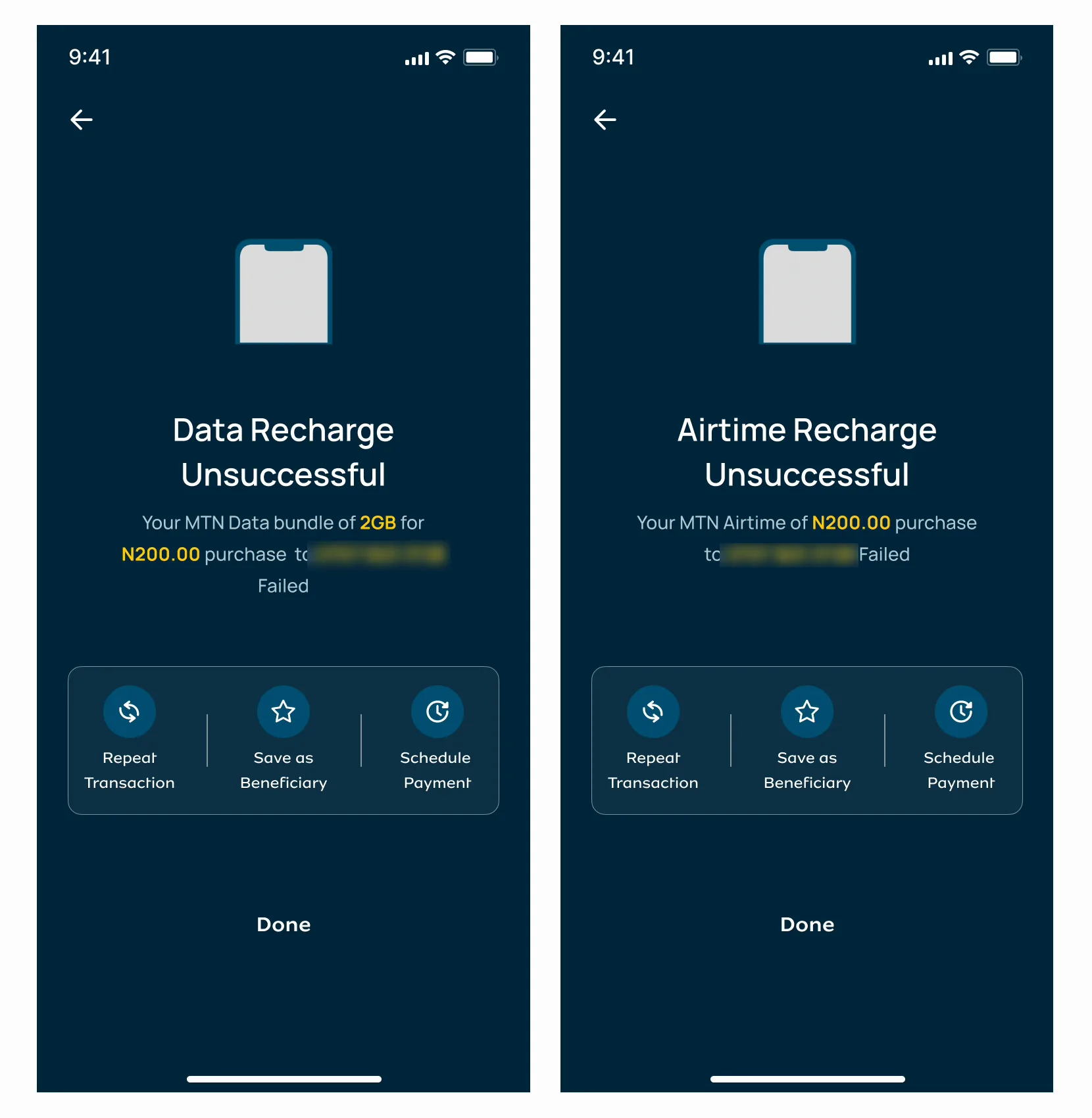
A failed payment says "Unsuccessful" in words, keeps the amount and the recipient on screen, and offers what to do next: retry, see the receipt, or report it. A failure gets a receipt too, because that receipt is what a customer shows when they ask for their money back.

Instead of
One "processing" screen for every outcome. It reads as success, so the customer only learns the truth from the SMS, or from their balance.
Trade-off
Failure becomes visible. Saying "failed" out loud invites the question "where's my money?", so every failure screen had to answer it: Retry, Show receipt, and Report failed transaction with the details already filled in.
How we'd know
Not measured by me. The numbers to watch are complaints about failed transactions and how many of them arrive with a receipt attached.

Then I went flow by flow and drew what failure looks like in each one: transfers, bank transfers, airtime, data, bills, betting, beneficiaries, sign-in, sign-up and forgot PIN. Each error says what happened in plain words and gives a way forward. When the connection drops, the error offers the USSD code, so a customer can still buy data without the app.

How it is now: "Unsuccessful", in words, with the amount and number kept on screen and a way to try again.
A failed data purchaseHow it is now: "Unsuccessful", in words, with the amount and number kept on screen and a way to try again.

Every flow in the first release has a row of error and empty states like these in the Figma file.

Chapter 03Before you send

Warn people before they send.

A transfer to another bank can fail on the other bank's side, after the customer has done everything right. From their phone, a failure at the other bank looks the same as a failure at MoMo. So the next question was: can we tell people before they press send?

Decision 02P2Transfers fail on the other sideThe problemA transfer can fail at the receiving bank, after you've already pressed send.

Show each bank's recent success rate on the way in.

The bank network monitor sits at the top of the transfer screen. It lists each bank's real-time success rate for transfers, split into stable and unstable, and points to the one route MoMo controls end to end: MoMo to MoMo, instant and free.

Instead of
Finding out after. The usual pattern explains a failure once the money is already stuck between two banks.
Trade-off
The rate describes everyone's recent transfers. A bank at 98% can still fail yours. So the monitor only informs, and the customer decides whether to send now, wait, or use another account.
How we'd know
Shipped; I don't have the numbers. The ones to watch: failed transfers to banks marked unstable, and how many people switch to MoMo to MoMo from the monitor.

The rest of the transfer follows one pattern, the same for every service in the app: confirm who you're paying (the name comes back from the bank), review the amount, the fee and the total, enter your PIN, and get a result with a receipt. A customer learns it once, sending money, and meets it again buying airtime, paying for electricity or funding a betting wallet.

The monitor first, then one way of moving money in five steps, used across transfers, airtime, data, bills and betting. Recipient names and account numbers are blurred.

Chapter 04Signing in

A sign-in that doesn't wait for a text.

The first question in MoMo's own FAQ was "Why didn't I receive the SMS OTP code?". A code that arrives late, or never, stops someone from reaching their own money.

Decision 03P3Codes that don't arriveThe problem"Why didn't I receive the SMS OTP code?" was the first question in the app's own FAQ.

Register the phone once, then sign in with a passcode.

A new device is checked once, with a security question and a code by email. After that, the customer signs in with a six-digit login passcode, kept separate from the four-digit PIN that approves payments, or with their face or fingerprint. Every new sign-in sends an alert email with the 24/7 number to call.

Instead of
An SMS code at every sign-in. It depends on a network the bank doesn't control, every time.
Trade-off
Every existing customer had to make a passcode. So the switch-over screen has "Remind me later", and the passcode rules refuse the easy ones: no "123456", no "111111".
How we'd know
Shipped; I don't have the numbers. The ones to watch: sign-in success rate, time to sign in, and support contacts about codes that never came.

Biometrics needed the same care. Signing in with your face is optional, and using it to approve payments is a separate switch, behind a plain statement: if you don't want to transact with your biometrics on this phone, don't turn this on. A phone that someone else uses can see "Not you? Switch account" at sign-in.

Chapter 05The rules, on screen

Regulation you can read.

A payment service bank works inside rules set by the Central Bank of Nigeria. A customer's tier decides how much they can send in a day and hold in their account, and moving up a tier means proving more about who they are. I couldn't change the rules. I could decide whether a customer meets them as an error or as a clear path.

So the tier is on the balance card from day one, the limits for all three tiers sit on one screen, and the upgrade is one tap from home. When someone types an amount above their limit, the field says so before they reach the PIN. When the CBN asked banks to update customers' KYC details, the request came in the app's own words, with the reason: to comply with the CBN's requirements.

Two sign-up paths came from the same rules. An MTN customer starts with their phone number and NIN. A customer on another network adds their BVN and a selfie check. And when an account is blocked because a NIN didn't validate, the customer can unblock it themselves, from the blocked screen, without a branch or a call.

Chapter 06Every day

Small things, for people who pay every day.

Most of the 64 requests after the first release were small, and they're the ones people notice every day. Frequent amounts as chips, so ₦500 of airtime is two taps. A Self or Others switch, so buying for your mum doesn't mean typing your own number away. Repeat a payment from its receipt. A text size setting, from small to extra large, for people who hold the phone at arm's length.

And a few that made the app feel local. Receipts with themes for Valentine's, anniversaries and the new year, and one for the most Nigerian request of all: "Urgent 2K". Payments by NFC tap and QR scan at the counter, with the fee shown before the PIN. Transfers to other African countries, with the exchange rate on the confirmation. The rating prompt only appears after a successful transfer, when people have a reason to be kind.

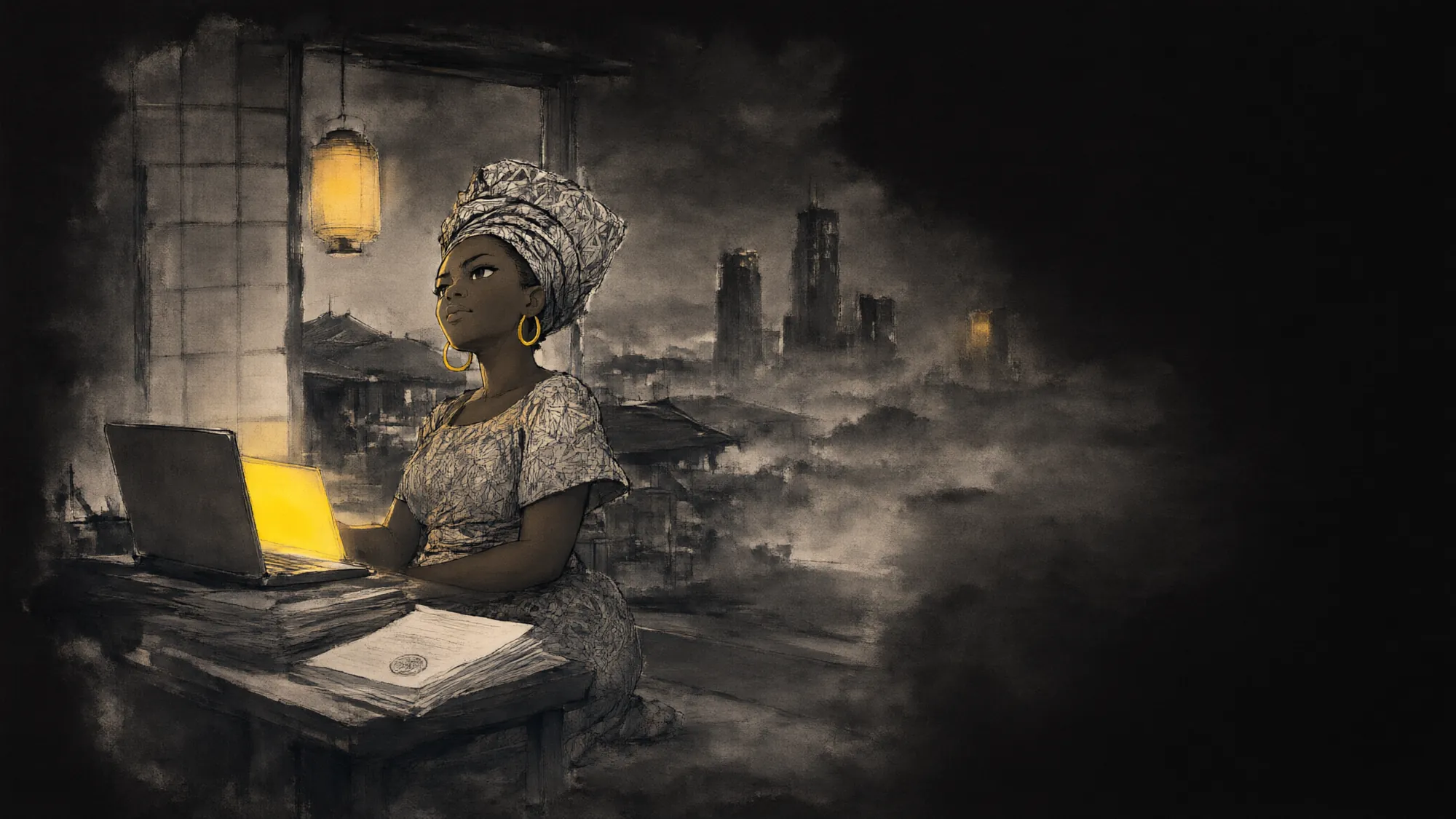
An ink painting at dusk: the same woman kneels at a low desk in the back of her shop, her laptop glowing yellow beside stamped company papers, the city towers rising out of the mist beyond an open paper door.An ink painting of the same woman at night, kneeling at a low desk in the back of her shop, her laptop glowing yellow beside stamped company papers, the city lights faint beyond an open paper door.

Part two

MoMo Corporate

For businesses, and the staff who check them. Web.

Design note · MoMo Corporate

  1. Context

    MoMo's staff invite businesses, called suppliers in the product, to open a corporate account. Opening one means proving who owns and runs the business.

  2. Goal

    A business can finish its application without a phone call, and two review teams can sign it off with a record of who did what.

  3. Non-negotiables

    The CBN's documents for a business account. Owners holding 5% or more identified. Screening for politically exposed people and sanctions. Two sign-offs before an account opens.

  4. How we'd know

    Time from invite to account number, applications sent back, and how many wait at each stage.

Chapter 07The business side

The same promise, for a business.

A business account carries more risk than a personal one, so opening it takes more: company registration, the directors, the owners, a board resolution, proof of address, and checks on every person behind the company. Before Corporate, that ran on forms and follow-ups, and nobody could see where an application was.

I designed it as one path with five stages, and a person who owns each one. The business only ever sees its own stages. MoMo's staff see all of them.

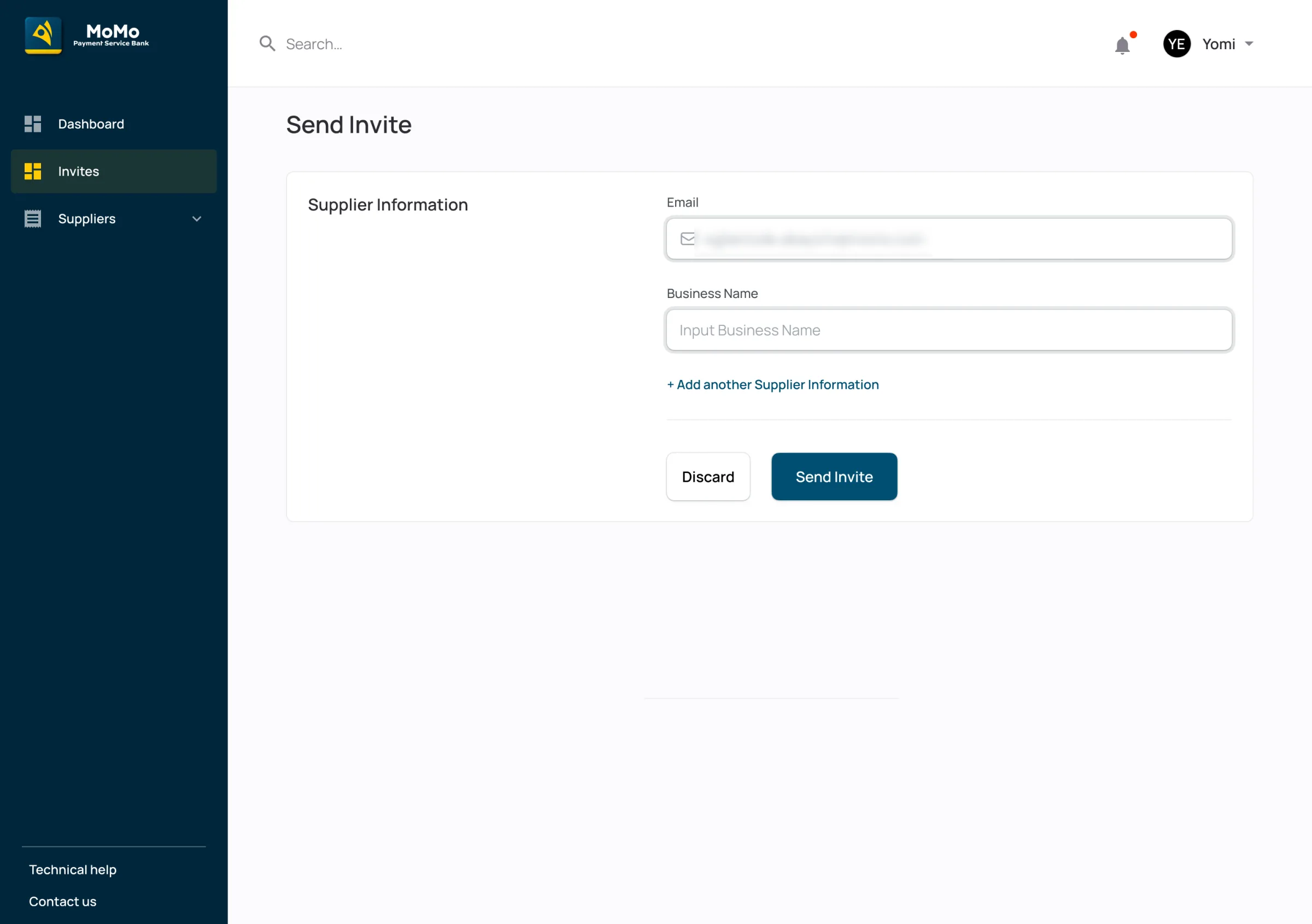
  1. InviteSupplier analystSends an invite to the business's email
  2. ApplyThe businessDownloads the forms, fills in four steps, uploads documents
  3. Onboarding reviewSupport analystApproves or declines each document, sends back what's missing
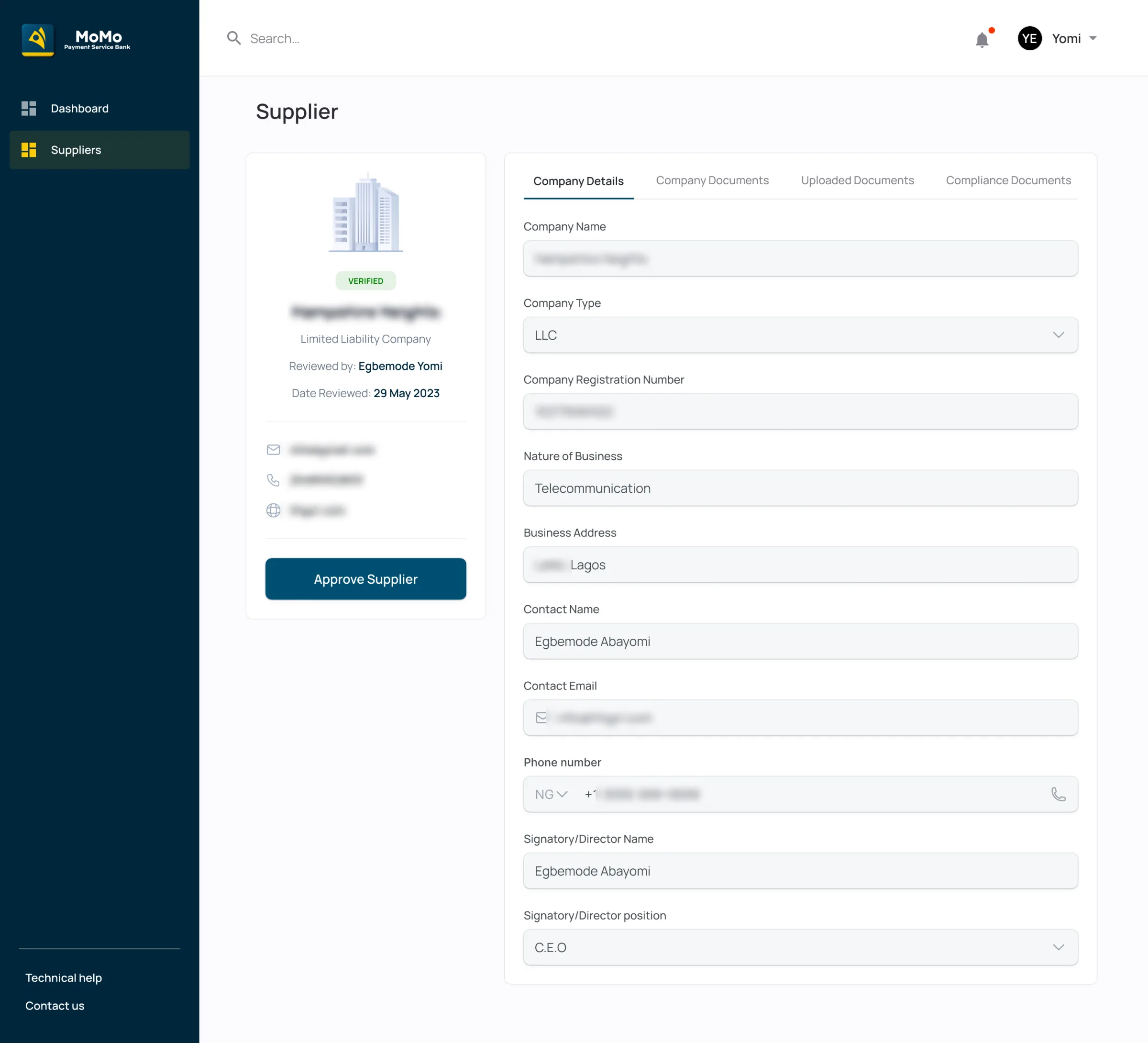
  4. ComplianceCompliance reviewerScreens the people, sets the risk level, approves
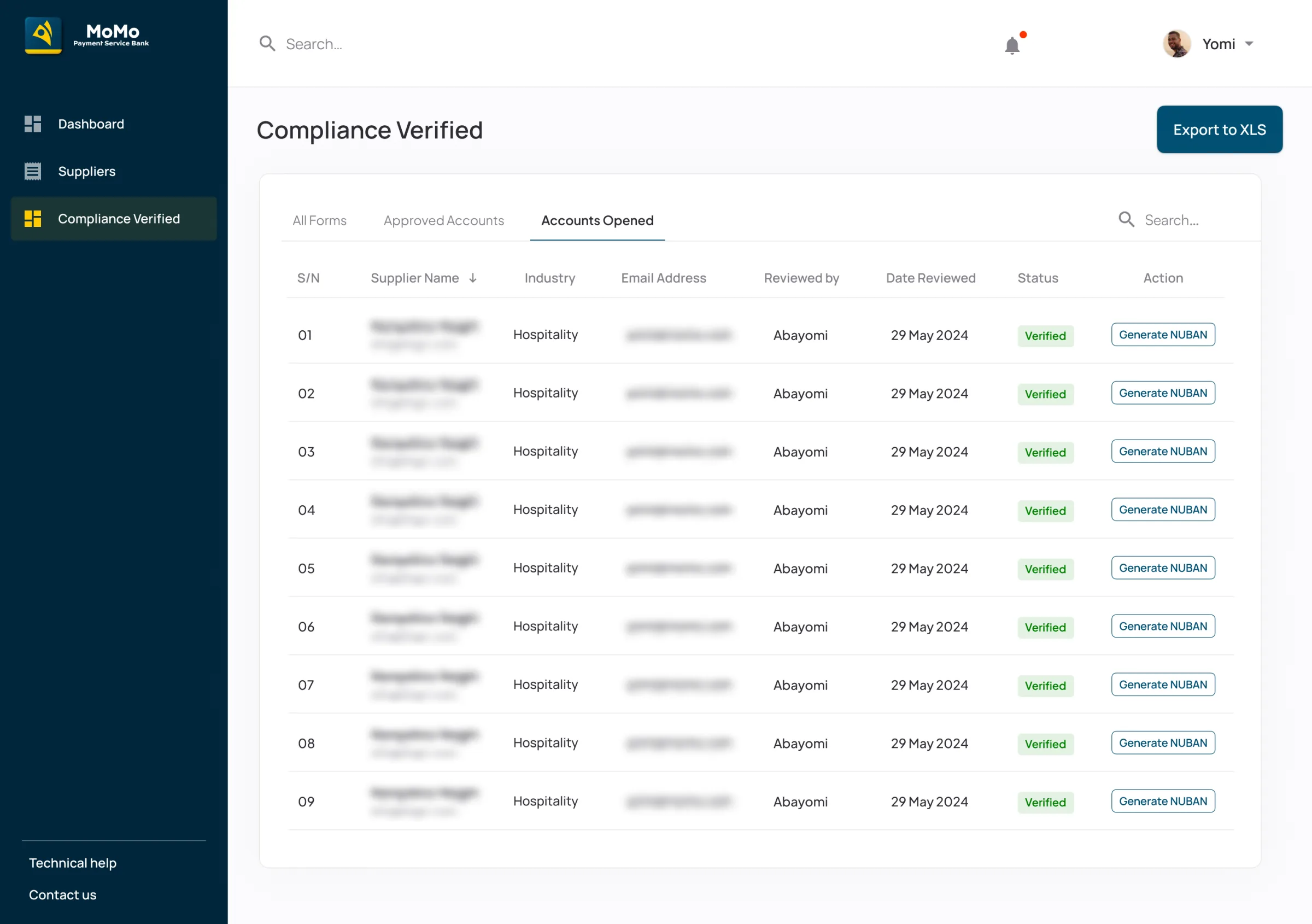
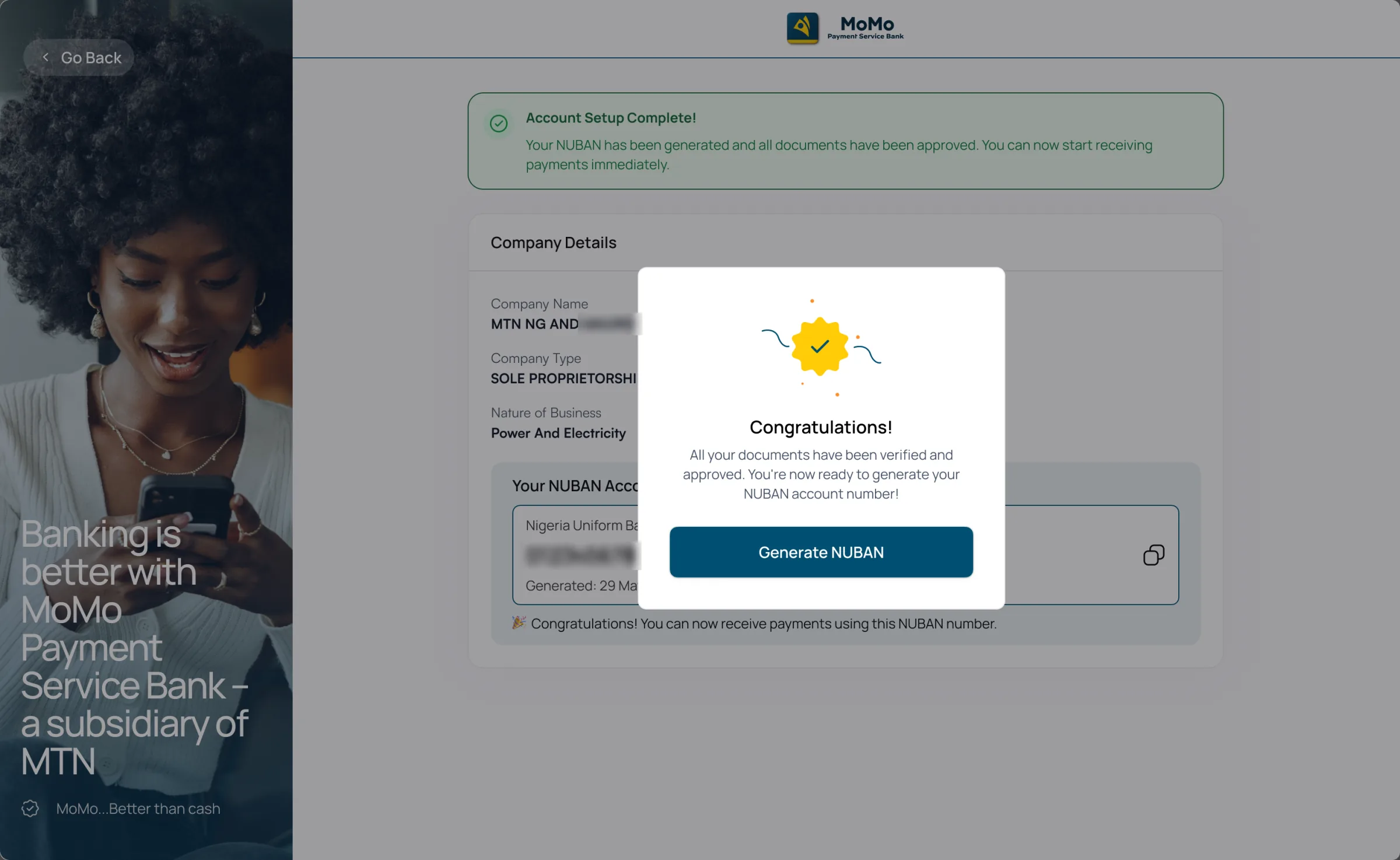
  5. AccountSuperadminGenerates the account number. The business is told.
Invite. Send invite: the business name and email, and "Add another supplier" to invite several at once.
One application, start to finishSend invite: the business name and email, and "Add another supplier" to invite several at once.

From the Corporate Figma file. Company names, people and email addresses are blurred.

Chapter 08Two sign-offs

Onboarding checks. Compliance decides.

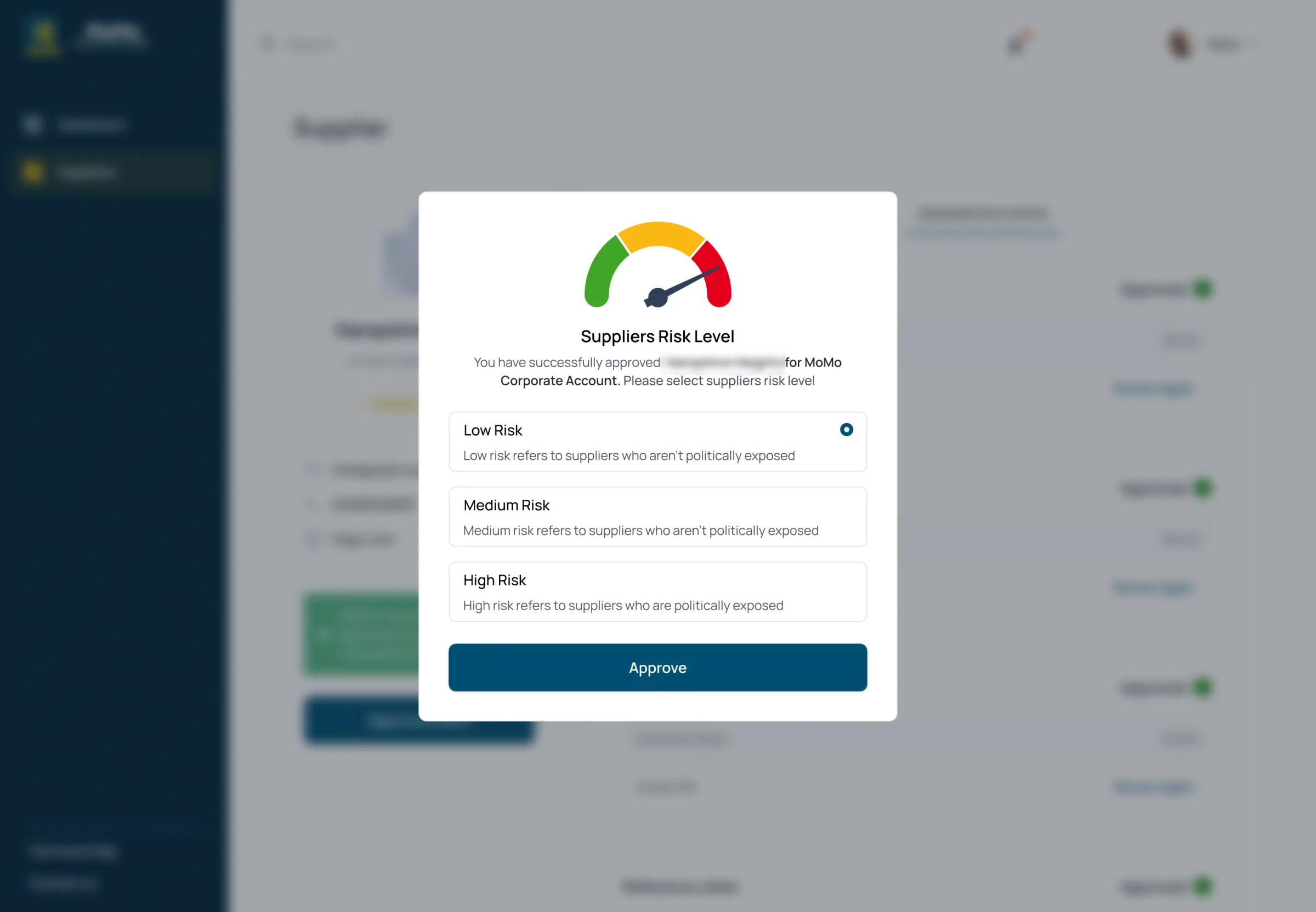
Two teams review every application, in order. The support analyst checks that each document is there, readable and right. Then they send it to compliance, who look at the people behind the company: are any of them politically exposed, are any on a sanctions list, how risky is this business? Each team has its own queue and its own dashboard, and the hand-over between them is one button: Send to compliance.

Decision 04P5Applications went quietThe problemOpening a corporate account was manual and hard to track, for the business and for MoMo's staff.

Send back a document, never the whole application.

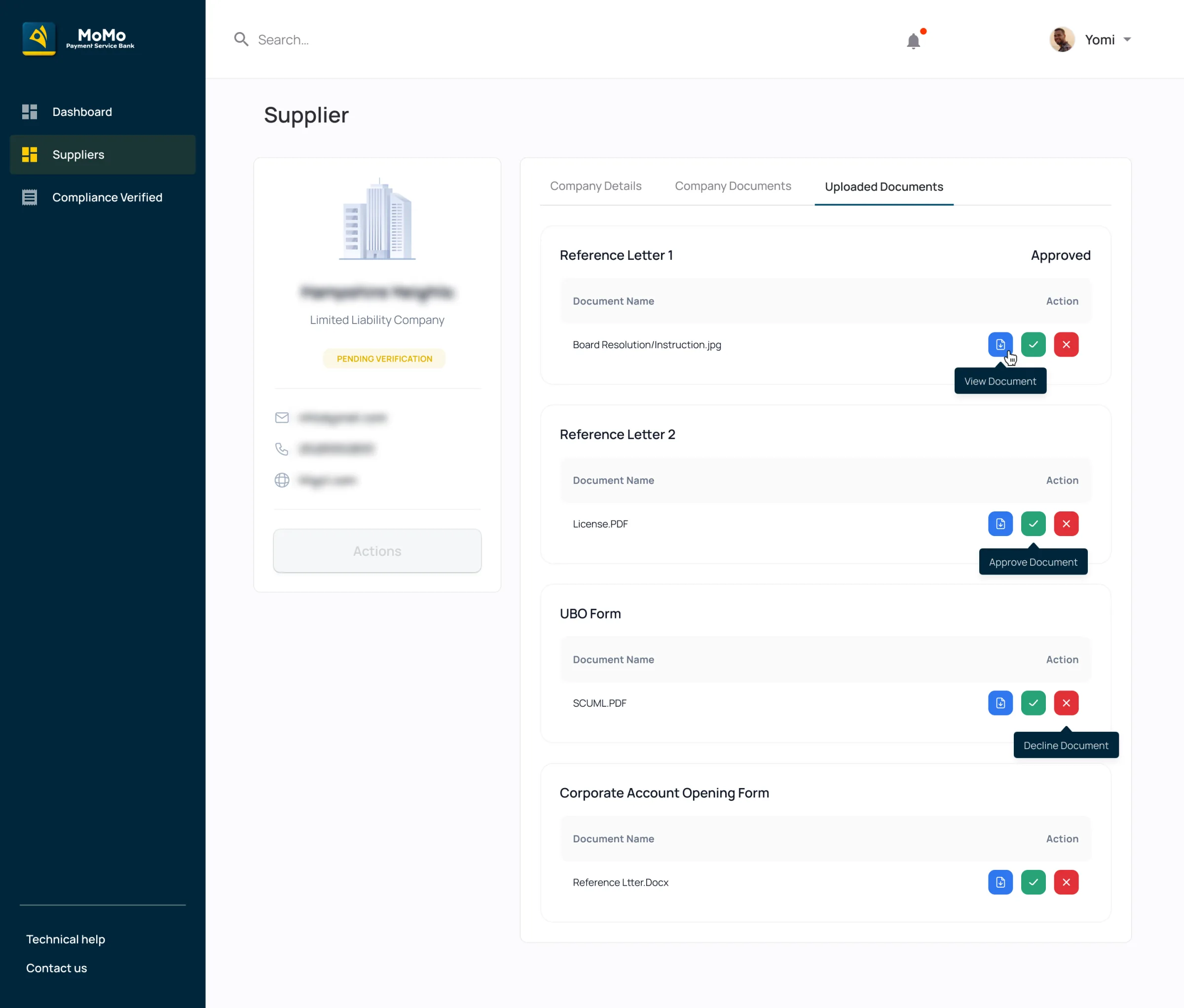
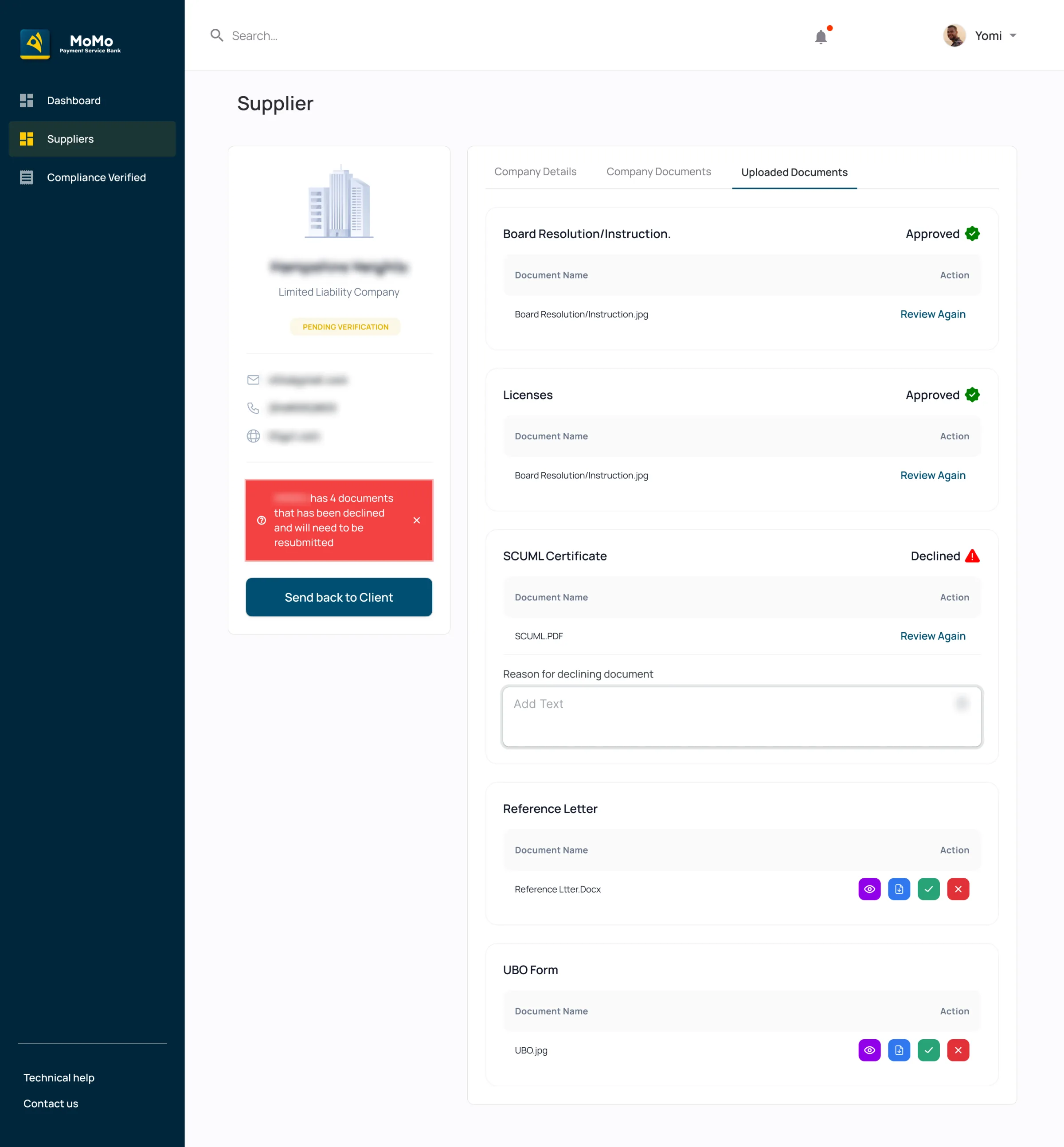
The analyst approves or declines each document on its own, and a decline needs a reason. A banner counts what's been declined, and Send back to client returns only those documents, with the reasons, while everything already approved stays approved.

Instead of
Approve or reject the application as a whole. One unreadable utility bill would send a business back to the start.
Trade-off
An application can go back and forth. So every decline has to carry a reason the business can act on, and the analyst can't send it back without one.
How we'd know
Not measured by me. How often an application is sent back, and the time from invite to account number.

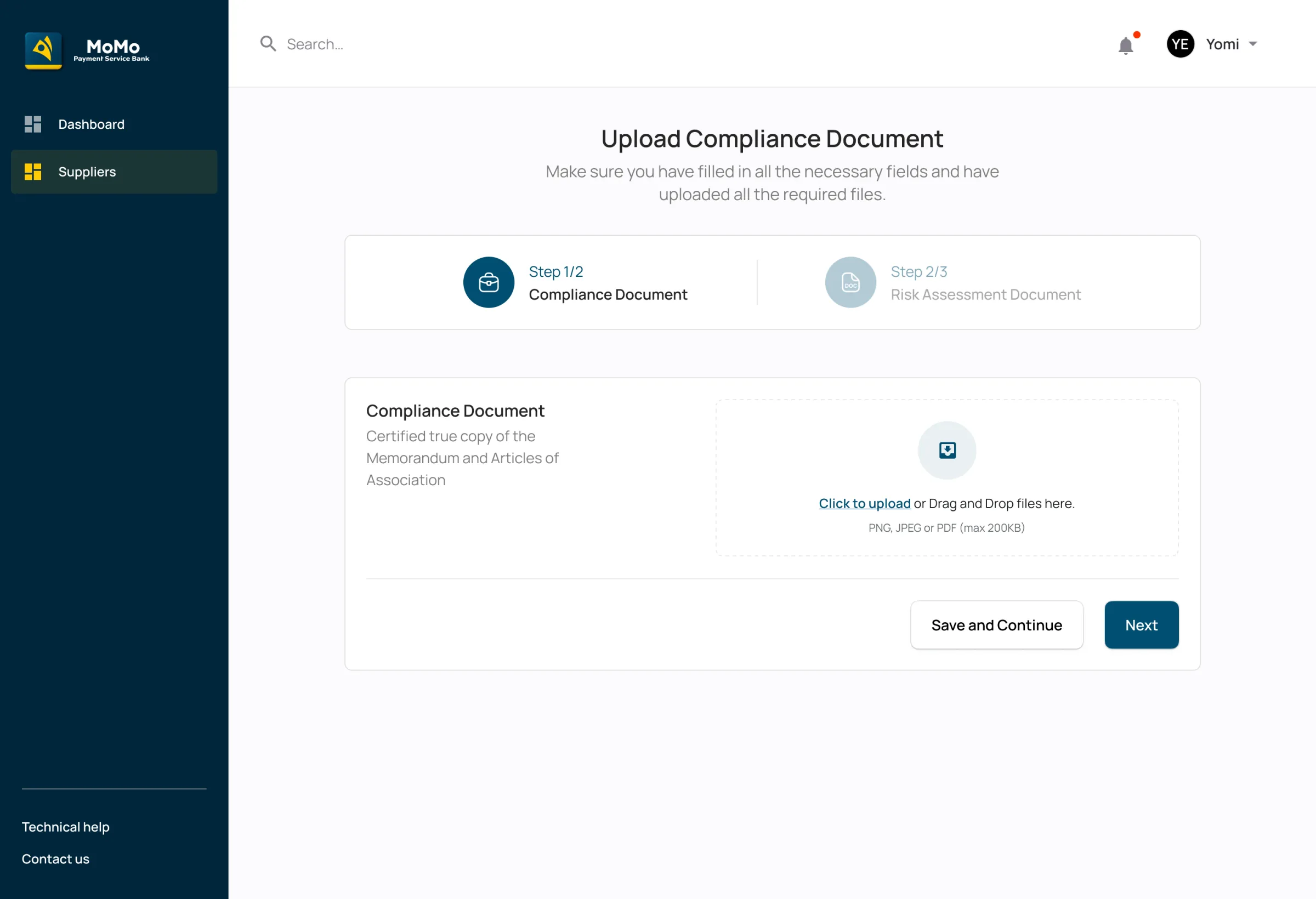
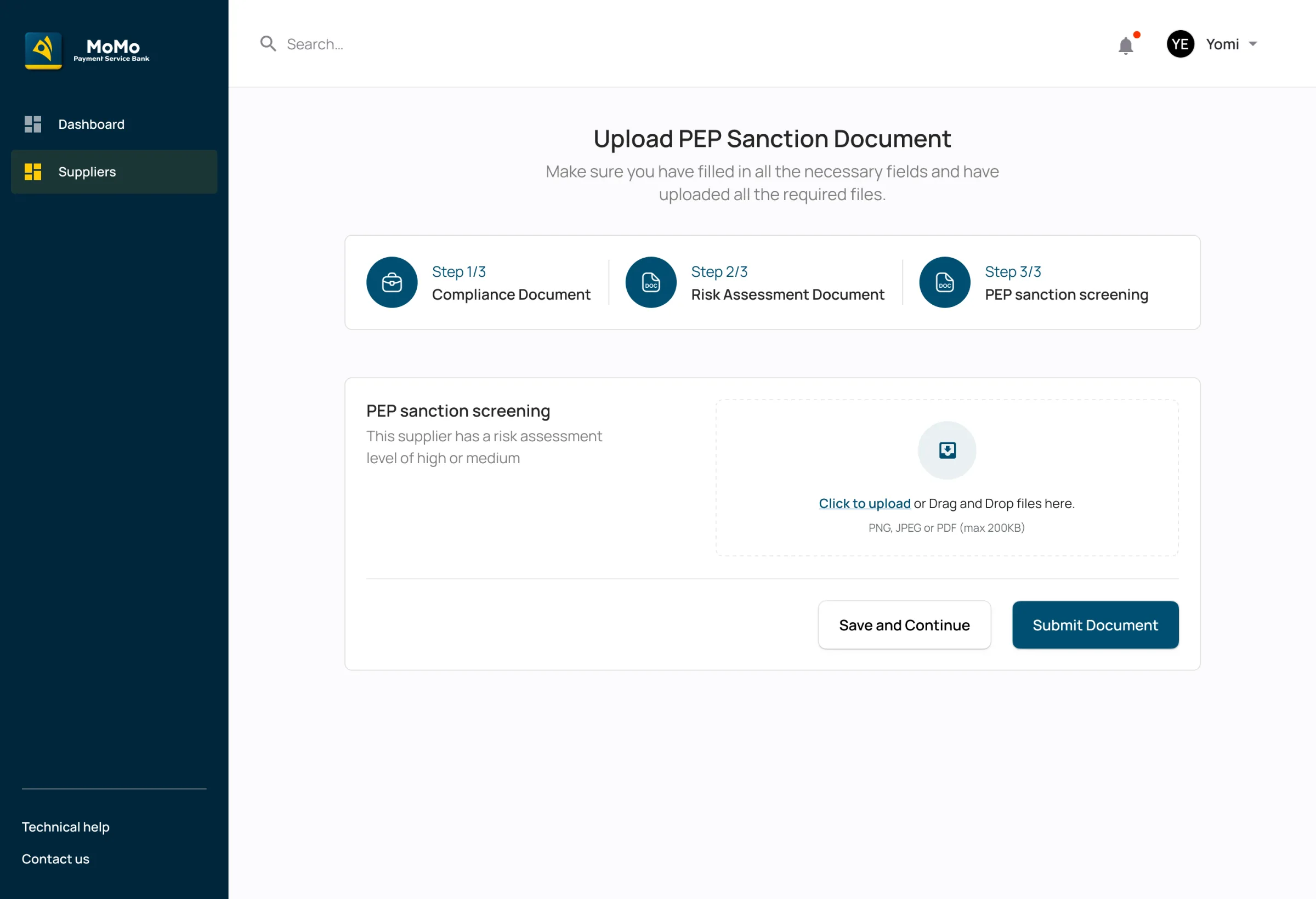
Compliance changed the most between versions. In the first version, compliance uploaded two documents: their compliance check and a risk assessment. In the update, a third step arrived for businesses rated medium or high risk: screening for politically exposed people and sanctions. Low-risk businesses skip it. The business's own form gained the matching question: are you, or a family member, politically exposed?

The updated review: four documents declined, each with its reason, a banner that counts them, and Send back to client.
Reviewing a business's documentsThe updated review: four documents declined, each with its reason, a banner that counts them, and Send back to client.
The update: step 3 of 3, PEP and sanctions screening, for a supplier with a risk assessment of high or medium.
What compliance uploadsThe update: step 3 of 3, PEP and sanctions screening, for a supplier with a risk assessment of high or medium.
Chapter 09A shorter form

Ask about each person once.

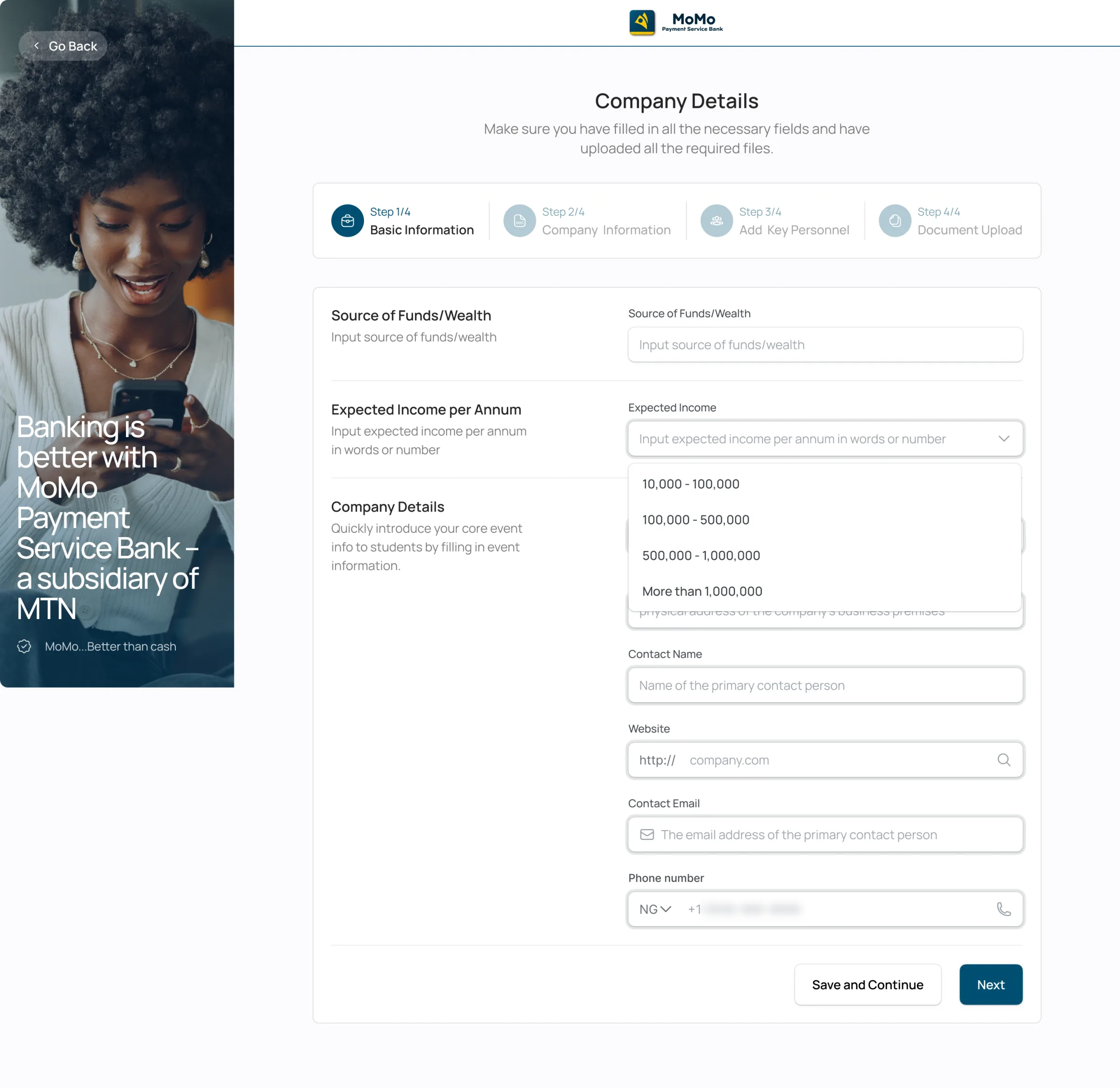
The application form is where a business either finishes or gives up. In the first version it asked about directors, then shareholders, then signatories, each in its own section, each asking for a BVN, an ID and the same personal details. In a small company one person is often all three, and they were typing themselves in three times.

Decision 05P4 P5The rules, and a quiet formThe problemsRegulation decides what a business must prove, and a long form is where applications stop.

One "key person", with the roles they hold ticked.

Directors, shareholders and signatories became one section: Key personnel. Each person is entered once, with their BVN, NIN, ID and PEP answer, and boxes for the roles they hold: shareholder, director, signatory. The form went from three steps to four, and each step asks less.

Instead of
A section per role. It matches how the regulation is written, not how a small company is run.
Trade-off
One more step in the progress bar. I split the form into basic information, company information, key personnel and documents, so each page has one job.
Evidence
Three sections became one, in the Feb 2025 update. The other change in that round, marked in the file: "Operating License and scuml not mandatory", so those two documents are now asked for only where they apply.

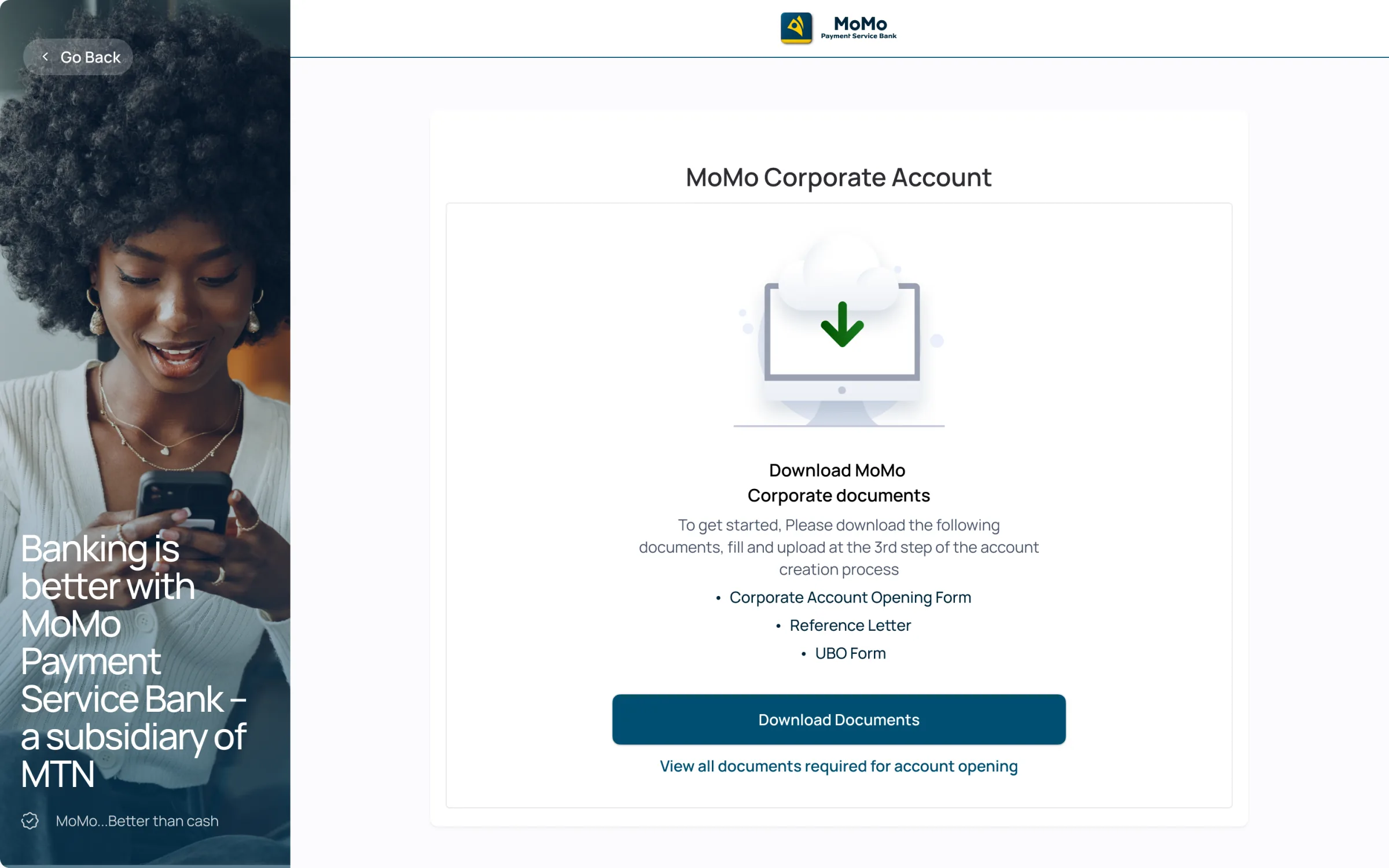
Smaller changes in the same spirit: expected income became a band to pick instead of a number to guess, and the forms the business has to sign are offered for download before it starts, so nobody discovers a board resolution on step four.

Chapter 10Where it is

Show where each application is stuck.

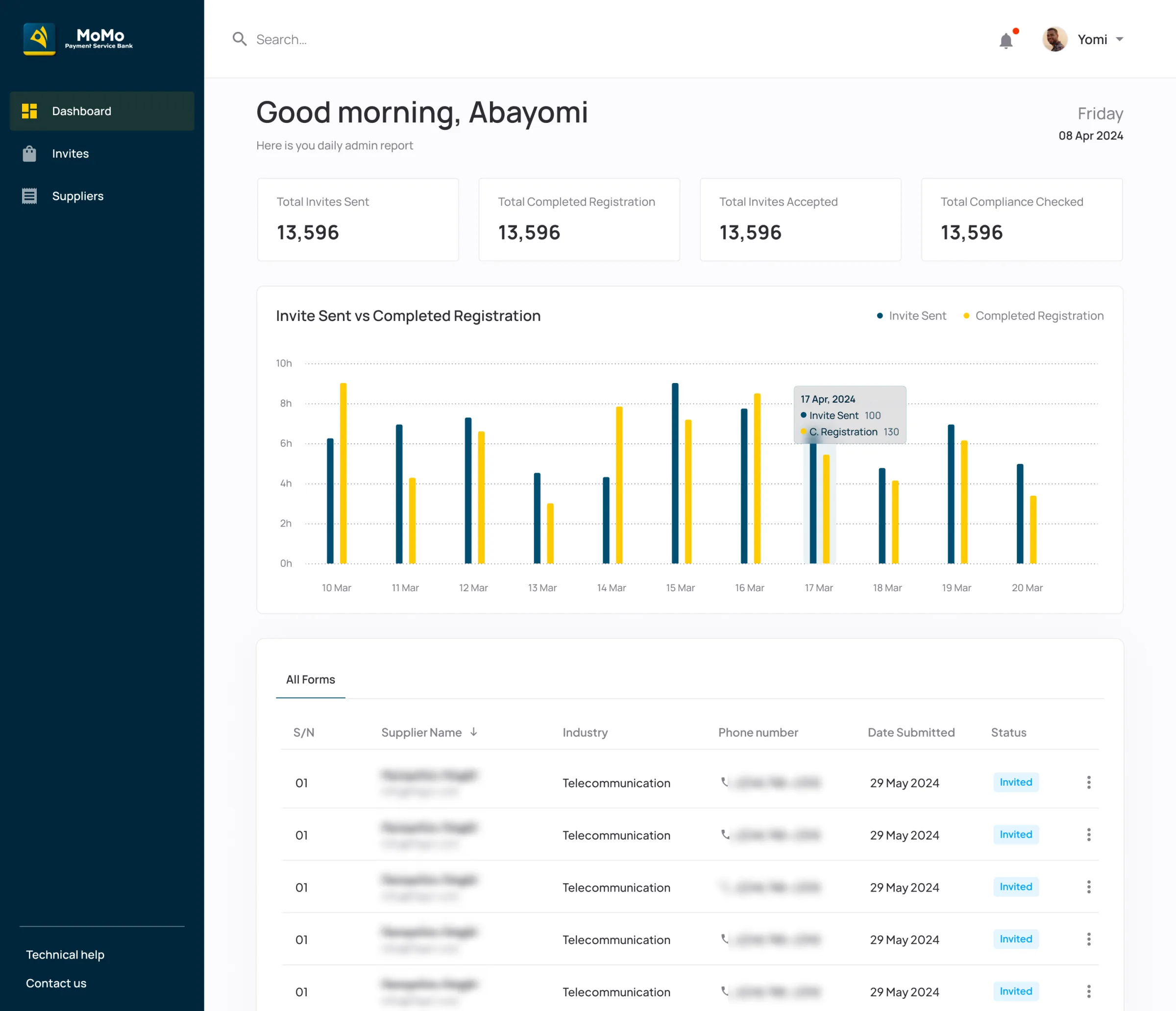
The first dashboard counted activity: invites sent, invites accepted, registrations completed, compliance checks done. Useful for a report, but it couldn't answer the question a manager asks every morning: where is everything stuck?

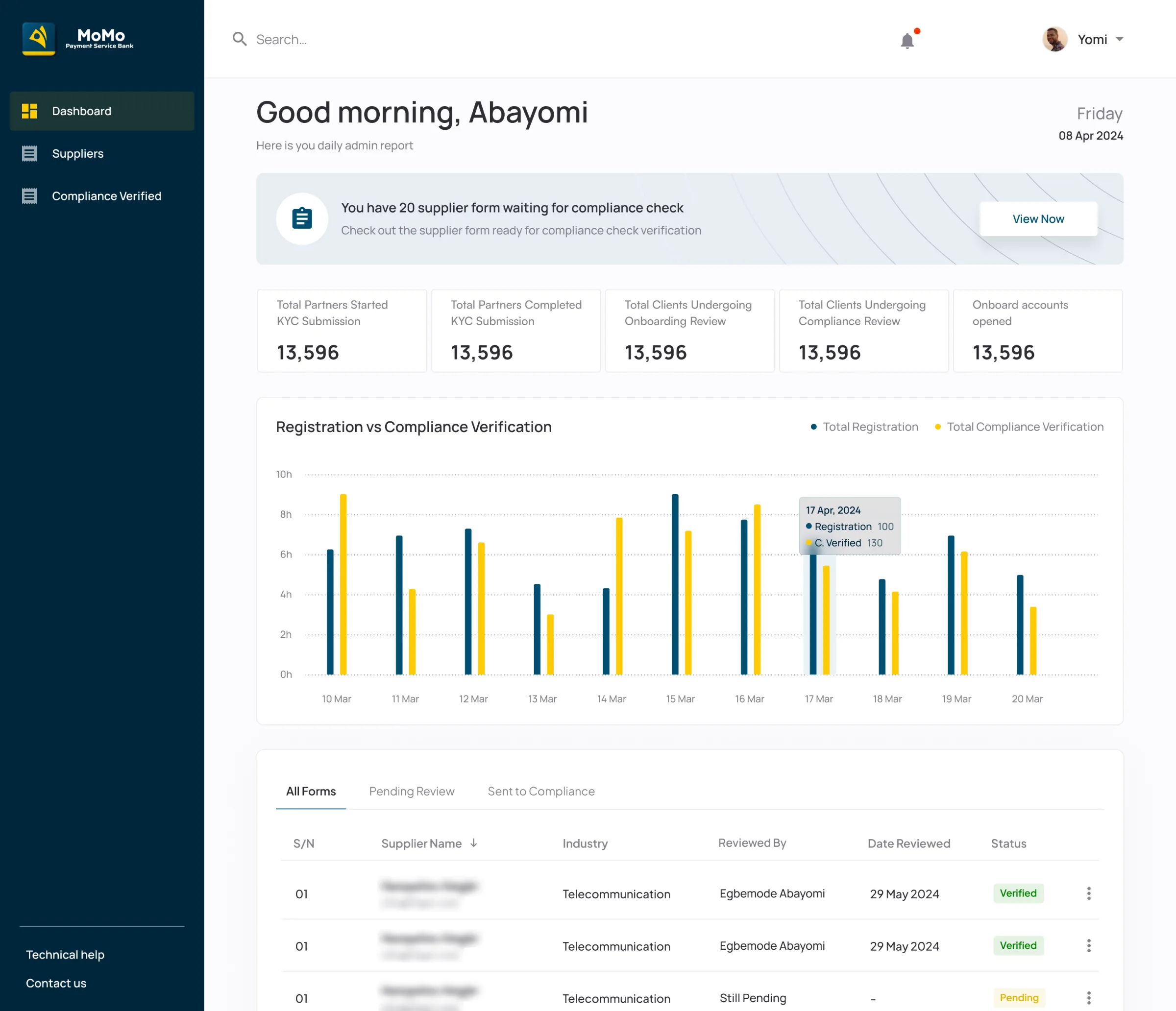
The updated dashboard counts by stage instead, from started KYC to account opened, and leads with what needs a person: "20 supplier forms waiting for compliance check". Behind it, every action is logged with who did it, their role, the account and the time, and the reports the business asked for are a click away, including a weekly summary sent on a schedule to compliance, marketing and management.

After: applications by stage, from started KYC to account opened, with the ones waiting for compliance called out first.
The dashboardAfter: applications by stage, from started KYC to account opened, with the ones waiting for compliance called out first.

The numbers on these dashboards are placeholders from the design file, not MoMo PSB's figures.

Chapter 11One system

Built from one set of rules.

Both products sit on the same colour system, which the file calls Sunshine: white for most of a screen, MoMo blue for structure, and yellow, MTN's yellow, kept for the things that need a tap. The rule is written beside the palette, 60, 30 and 10, so anyone picking a colour knows how much of it a screen can take. The colours are set up as tokens with a light and a dark value, which is how the app got its dark mode without a second set of screens.

Handing over mattered as much as the screens. Each flow went to engineering with its error and empty states, changes from the business analysts and product owners were noted on the page where they happened, and the open questions sat beside the screens they belonged to, like "Retries limit screen, what happens?" on sign-in. I'd rather an engineer find the answer in the file than in my messages.

Chapter 12Where it stands

Shipped, release after release.

The app shipped on iOS and Android and kept shipping: the first release in three sprints, then 64 feature requests on top, the bank network monitor and the passcode sign-in among them. MoMo Corporate shipped with its staff side and is live today; a later update added role management, the audit log and the reports. After launch, onboarding drop-off fell 30%, transaction success rose 20% and corporate invitations rose 20%. Those numbers cover whole products, so each decision above still names the narrower signal that would show its own effect.

How the work moved: business analysts and product owners brought requests, often from customer complaints and from compliance; I turned each into a Figma page with every state drawn; engineers built from that page. When a request changed, the change was noted on the page where it happened, so nobody had to reconstruct a decision from chat.

Funmi never sees a success rate being worked out, a compliance queue or an audit log. She sees a name come back before she pays, a plain answer when something fails, a receipt she can show, and one day an account number for her company.

What I'd do differently:

  1. Agree the numbers on day one. Each decision above has a "how we'd know". I'd put those to the product owner at the start of each release and ask for them back after it, so the next release starts from evidence.
  2. Give the business the tracker staff have. In the designs, after a business submits, it sees that review takes 48 hours, and then waits. I'd show it the same stages MoMo's staff see, with the one it's in.
  3. Test the monitor's words with customers. "Success rate" is a banker's phrase. I'd test whether people read 40% as "don't send now" before trusting the screen to change behaviour.
  4. Put the colours in code from the first sprint. In 2023 we weren't building with AI tools yet, so the Sunshine tokens lived in the Figma file and engineers built from it by hand. Today I'd use AI with the engineers to turn the tokens into code at the start, so the app and the file can't drift apart. It's how I build my own products now.


Credits

App design
Egbemode AbayomiReleases 1 and 2
Dark mode support
Yasmeen AdebisiRelease 1
MoMo Corporate design
Egbemode AbayomiThe business's application and the staff side
Requirements and build
MoMo PSB's product teamBusiness analysts, product owners and engineers
The client
MoMo Payment Service BankA subsidiary of MTN, licensed by the Central Bank of Nigeria

MoMo in 23 seconds

The film I made for this case study: Funmi's day in ink, the real MoMo screens, and motion built in code with HyperFrames.

0:00